App Permissions in Mobile Games: What Games Ask For and Why
Location, microphone, contacts, notifications, tracking: which permissions games legitimately need, how to review them, and how to say no without breaking the game.

When you install and play a game, it may ask for access to things on your phone: notifications, your microphone, your location, your photos, or permission to track you across other apps. Some of these requests have a clear reason; others are optional. Both iPhone and Android let you decide, and you can change your mind later.
Common permissions and their usual reasons
| Permission | Common legitimate reason | Usually necessary? |
|---|---|---|
| Notifications | Alerts for timers, events and messages | No |
| Microphone | Voice chat in multiplayer games | Only if you use voice chat |
| Location | Location-based games, regional matchmaking | Only for location-based games |
| Camera | Augmented reality features, scanning codes | Only for those features |
| Photos | Saving screenshots, custom avatars | Rarely |
| Contacts | Finding friends | No |
| Tracking across apps | Personalised advertising and measurement | No |
Ask "does this feature need it?"
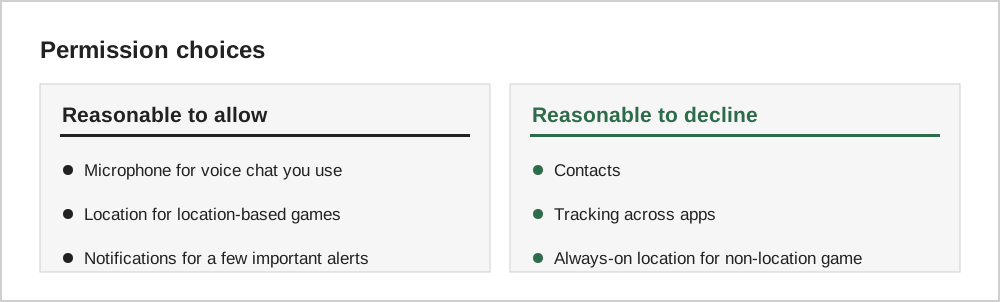
The simplest test is whether the permission matches something you actually use. A location-based game needs location; a puzzle game usually does not. A game with voice chat needs the microphone only when you use voice chat.
Tracking requests
On iPhone, apps must ask permission before tracking you across other companies' apps and websites, through App Tracking Transparency. Choosing "Ask App Not to Track" does not stop the game from working; it limits certain advertising and measurement. Android provides controls for personalised ads and an advertising ID that you can reset or delete in the privacy or ads settings, depending on your version.
Notifications are a choice
Games often ask for notification permission early. It is safe to decline, or to allow and then turn off most categories later. Our guide on healthy play habits explains why fewer notifications usually means a more enjoyable game.
Store privacy labels
Before installing, the App Privacy section on the Apple App Store and the Data safety section on Google Play describe what data the developer says the app collects. These are self-reported, but they are a useful starting point, as described in our guide to reading a store page.
Reviewing permissions you already granted
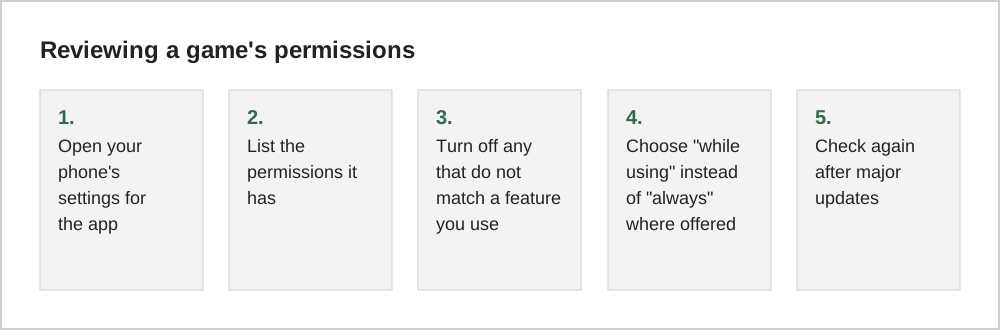
Permissions are easy to approve and forget. On iPhone, Settings, Privacy and Security lists each permission type, such as location, microphone or photos, and the apps that have it. On Android, the Privacy section of Settings includes a permission manager that shows the same information. Reviewing these lists every few months takes a few minutes.
Recent versions of both systems also show indicators when the camera or microphone is in use, and Android can automatically remove permissions from apps you have not used for a while. These features make it easier to spot a game asking for more than it needs.
Location and games
Some games genuinely need location, such as games that place objects in the real world. Many others do not. Where possible, choose approximate rather than precise location, and allow it only while the app is in use. For children's devices, keep location sharing off for games unless there is a clear reason.
Common questions
Will a game stop working if I deny a permission?
Usually not. Most games keep working when you decline optional permissions such as contacts, tracking or notifications. Features that genuinely depend on a permission, such as voice chat without microphone access, will simply be unavailable until you allow it. If a game refuses to start without a permission that has no obvious purpose, that is a good reason to be cautious about the app.
Why does a game ask for permissions again after an update?
New features sometimes need new permissions, and both platforms may ask again if a permission was set to ask each time. Treat a new request the same way as the first: allow it only if it matches a feature you want to use.
Should I worry about games accessing my photos?
Modern versions of both platforms let you share selected photos rather than your entire library. If a game only needs to save screenshots or let you pick an avatar, choosing limited access is a sensible middle ground.
The short version
Grant permissions only when they match a feature you use, prefer "while using the app" over "always", decline tracking if you prefer fewer personalised ads, and review permissions after updates. Games almost always keep working when you say no to optional permissions.