How to Read a Mobile Game Store Page Like a Skeptic
Screenshots, ratings and "in-app purchases" labels tell you more than the marketing text. Here is what to look at, in order, before you download a game.
A game's store page is an advertisement. That is not a criticism; it is simply what the page is for. The trick is to read it the way you would read any advert: with interest, but looking for the details the advertiser has to include rather than the ones they want you to notice.
This guide goes through a typical store page on the Apple App Store or Google Play and explains what each part can and cannot tell you.
1. The labels near the install button
Both major stores show short labels that are easy to skip but very informative.
| Label | What it tells you |
|---|---|
| In-App Purchases (or "Offers in-app purchases") | The game sells items or currency inside the app |
| Contains ads | The game shows advertising |
| Age rating | The content rating assigned for your region |
| Size | How much storage the initial download needs |
A game that shows both "contains ads" and "in-app purchases" is earning money in two ways. That is common, and often fine, but it is worth knowing before you start. The age rating is covered in more depth in our guide to age ratings.
2. The list of in-app purchase prices
Some store pages list the most popular or typical in-app purchase prices. If your store shows this, it is one of the most useful pieces of information on the page. A list that tops out at a few dollars suggests a light purchase model. A list that includes very expensive bundles suggests the game is built around heavy spenders.
3. Screenshots and videos
Screenshots are selected to show the most exciting moments. Look for clues about the everyday experience instead:
- Are there visible timers, energy bars or "speed up" buttons?
- Do the screenshots show menus full of offers and currencies?
- Are the screenshots actual gameplay, or polished artwork?
Some advertisements for mobile games show gameplay that is quite different from the real game. Store screenshots are generally subject to rules about representing the app accurately, but it is still wise to watch a few minutes of gameplay recorded by an ordinary player before committing time.
4. Ratings and reviews
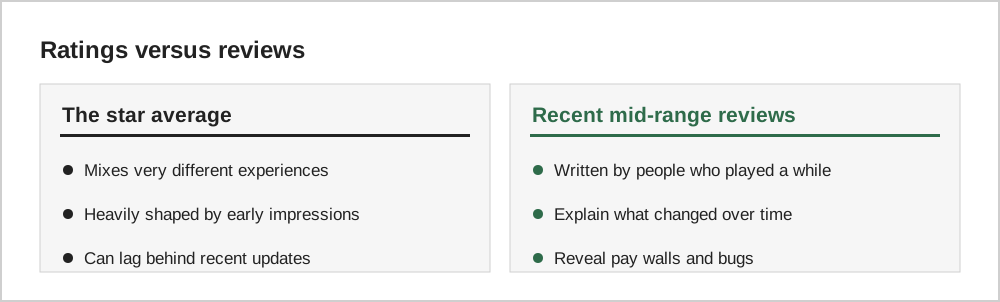
The average star rating is a blunt instrument. Read a handful of recent reviews with two or three stars. These often come from people who enjoyed the game but hit a frustration later, such as a sharp difficulty spike, aggressive ads after an update, or server problems.
Developer replies to reviews are also informative. Thoughtful, specific replies suggest an engaged team; identical copy-and-paste replies tell you less.
5. Update history and data safety
The "What's New" section shows how often the game is updated. A long gap may mean the game is no longer maintained, which matters for online games.
Both stores also show privacy information. On the Apple App Store, look for the "App Privacy" section; on Google Play, look for "Data safety". These describe what data the developer says the app collects and how it is used. They are self-reported by developers, so treat them as a starting point rather than a guarantee.
6. The developer's other games
Tapping the developer name shows their other titles. A developer with many near-identical games may be focused on volume rather than quality. A developer with a few long-running, regularly updated games is often a safer bet.
A quick reading order
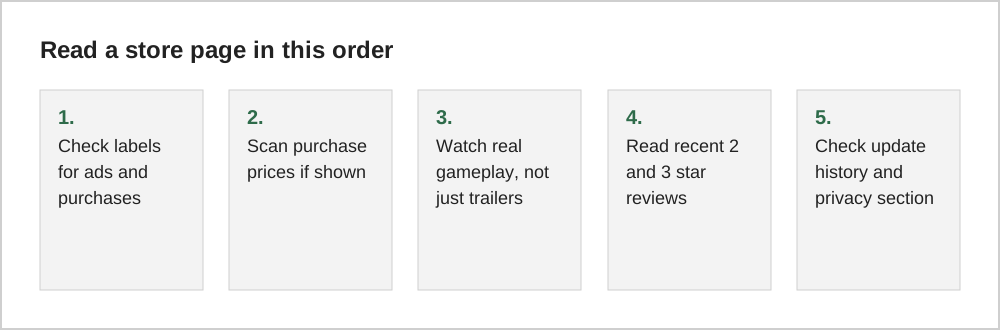
What a store page cannot tell you
No store page can tell you whether a game will suit you. It cannot show how progression feels after a week, or whether the community is friendly. That is why our guide on choosing your first mobile game recommends a short, no-spending trial before you invest time or money.
The short version
Read the small labels first, then the purchase prices, then recent mid-range reviews. Treat screenshots as marketing and privacy labels as the developer's own description. Together, these details tell you far more about a game than its star rating or headline text.