Battery Drain and Overheating While Gaming: Practical Fixes
Demanding games use a lot of power and generate heat. Settings and habits that extend battery life and keep your phone cooler during play.
Mobile games can be some of the most demanding things your phone does. High frame rates, detailed graphics, a bright screen and a constant network connection all use power and generate heat. A few adjustments can make a noticeable difference to battery life and comfort.
Where the power goes
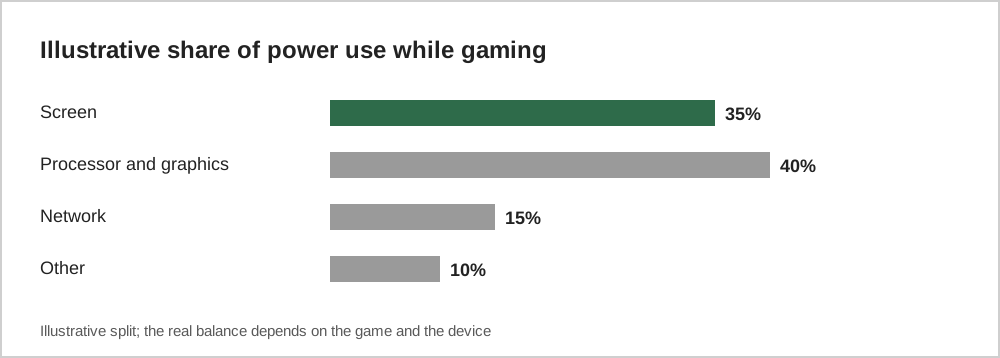
The screen and the processor are usually the biggest consumers. That means the most effective changes involve brightness, frame rate and graphics quality.
In-game settings
Many games offer graphics options. The ones with the biggest effect on battery and heat are:
| Setting | Effect of lowering it |
|---|---|
| Frame rate (FPS) | Large savings; 30 FPS uses less power than 60 or higher |
| Graphics quality | Less work for the processor |
| Resolution | Fewer pixels to draw |
| Effects such as shadows | Smaller but useful savings |
Phone settings
- Lower screen brightness, or use automatic brightness.
- Use low power or battery saver mode for long sessions; it may reduce performance slightly.
- Close other apps that are using location, streaming or downloading in the background.
- Prefer Wi-Fi to mobile data when available, since weak mobile signals can increase power use.
Heat: why it matters
Phones reduce performance when they get too hot, which can cause stutters and frame drops. Heat over long periods can also affect battery health.
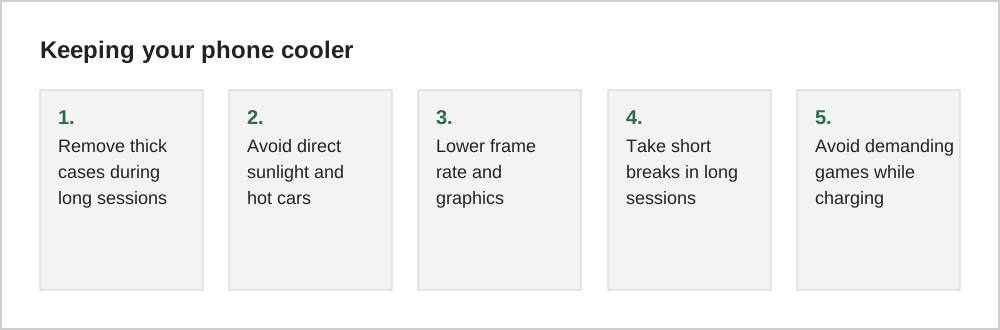
Playing demanding games while charging produces heat from both the charging and the game at the same time. If your phone gets noticeably hot, unplug it or take a break.
Charging habits
Modern phones manage charging carefully, and many include features that optimise charging to reduce battery wear. Using the charger that came with your phone, or a reputable certified one, is safest. Avoid leaving a phone charging under a pillow or in other places where heat cannot escape.
A ten-minute battery test
To see how much a game costs in battery, charge your phone to a round number, close other apps and play for ten minutes with your usual settings. Note the drop. Then lower the frame rate or graphics quality, recharge to the same level and repeat. Many players find that a lower setting reduces the drain noticeably with little visible difference on a small screen.
Both iOS and Android also show battery use by app in the settings menu. Checking this weekly helps you notice when an update has made a game much more demanding, which is not unusual after major content releases.
When heat is a warning sign
Phones get warm during demanding games, and that is normal. Be cautious if the phone becomes too hot to hold comfortably, if the screen dims on its own or if a temperature warning appears. Stop playing, remove any case and let the phone cool in a shaded place. Avoid cooling it in a fridge, since sudden temperature changes can cause condensation inside.
Common questions
Is it bad to play while the phone is charging?
Occasional play while charging is generally fine, but demanding games combined with fast charging produce extra heat. If the phone becomes noticeably hot, unplug it or switch to a lighter activity until it cools down.
Do gaming phone modes help?
Many phones include a gaming mode that blocks notifications and adjusts performance. Some prioritise performance, which can increase heat and battery use, while others offer power-saving profiles. Check what your device's mode actually does before relying on it.
Why does my phone feel slower after a long session?
When a phone gets hot, it reduces performance to protect itself, which can cause stutters. Taking a short break, removing a thick case and lowering graphics settings usually restores smooth play.
The short version
The screen and processor use most of the power while gaming. Lower brightness, frame rate and graphics where you can, close background apps, and let your phone cool down when it gets hot, especially while charging.