How Much Mobile Data Do Games Use? Keeping Data Under Control
Gameplay itself often uses less data than you expect, while downloads, updates and video ads use far more. How to check data use and avoid surprises.
Many people assume online games burn through mobile data quickly. In practice, the gameplay itself is often modest, because games usually send small updates about player actions rather than streaming video. The big data users are downloads, updates, video ads and streamed content. Knowing the difference helps you avoid surprises on your bill.
What uses the most data
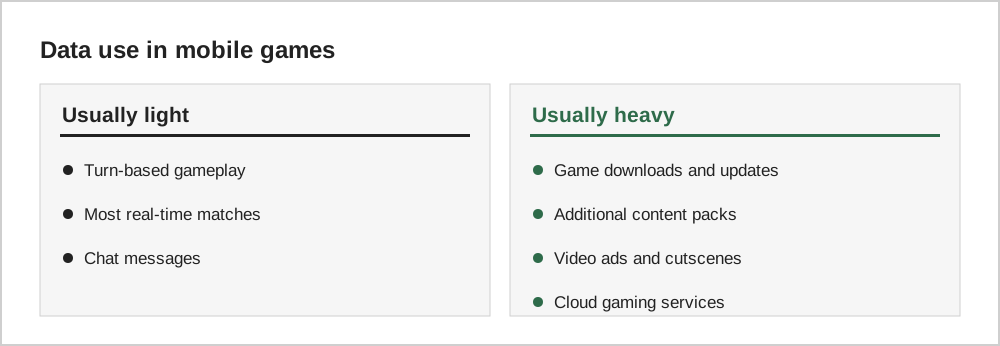
| Activity | Typical data use |
|---|---|
| Initial download and updates | Often hundreds of megabytes to several gigabytes |
| Additional in-game content | Can be large, especially on first launch |
| Video ads | Each ad uses data, which adds up in ad-heavy games |
| Cloud gaming (streaming the whole game) | Very high, similar to streaming video |
| Ordinary online gameplay | Usually modest compared with video |
Exact numbers vary widely between games, so the best approach is to check your own usage.
Check your data use
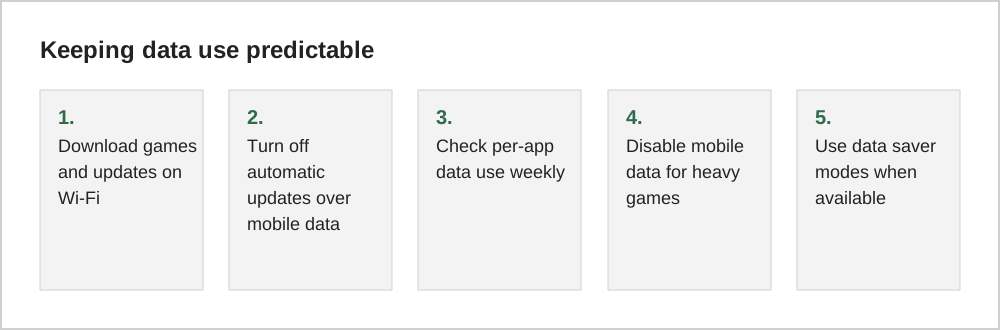
Both iPhone and Android show mobile data use per app. On iPhone, look under Mobile Data (or Cellular) in Settings. On Android, look under Network or Connections, then Data usage. Check after a few days of normal play to see which games use the most.
Updates and downloads on Wi-Fi
Both app stores let you choose to download updates only on Wi-Fi. Many games also download extra content on first launch, so open a newly installed game on Wi-Fi before playing it on the go.
Ads and data
Games with frequent video ads use more data than you might expect. Each video ad is a small download; dozens of them per day add up. A one-time "remove ads" purchase in a game you play daily can reduce both interruptions and data use.
Cloud gaming is different
Cloud gaming services stream the game from a remote server, more like watching video than playing a downloaded game. They can use a lot of data and need a stable, fast connection. Use them on Wi-Fi unless you have a large or unlimited data plan.
Rough figures to expect
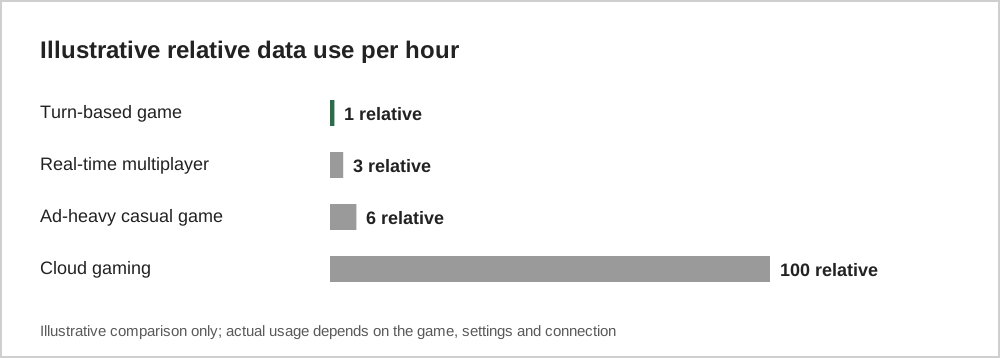
Data use varies widely, but some patterns are common. Simple puzzle and idle games often use very little data during play, though ads can add more. Online multiplayer games send small updates frequently and typically use more. Video ads, streamed cutscenes and cloud gaming use the most, and cloud streaming can reach several gigabytes an hour.
The largest single cost is usually updates and downloadable content, which can be hundreds of megabytes or more. That is why setting updates to Wi-Fi only is the most effective way to protect a limited mobile plan.
Settings to check
On iPhone, the Mobile Data (or Cellular) section of Settings lets you switch off mobile data for individual apps. On Android, the network or data usage settings show per-app use and let you restrict background data; exact menu names vary by manufacturer. Many games also include an in-game option to download assets only on Wi-Fi.
Common questions
Does voice chat use a lot of data?
Voice chat uses more data than text chat or ordinary gameplay messages, because audio is sent continuously while people are talking. It is still usually far less than video streaming, but in long sessions on a limited plan it is worth keeping in mind.
Will playing offline save data?
Games that work offline use no mobile data while offline, although they may sync progress or download ads the next time you connect. Some free games need a connection for ads and will not run offline at all.
Should I worry about roaming charges?
Yes. When travelling abroad, data roaming can be expensive. Download and update games before you leave, set games to Wi-Fi only, and check your carrier's roaming options.
The short version
Most gameplay uses less data than people expect; downloads, updates, video ads and cloud gaming use much more. Download and update on Wi-Fi, check per-app data use, and restrict mobile data for heavy games if you are on a limited plan.